Overview
What Is Container Desktop?
Container Desktop is an open-source alternative to Docker Desktop. It enables you to build, push, pull, and run Linux containers on Microsoft Windows by providing seamless integration with Docker Engine Community Edition running on Windows Subsystem for Linux. Container Desktop bundles the open-source Docker and Docker Compose CLI clients for a native and simple user experience.
How It Works
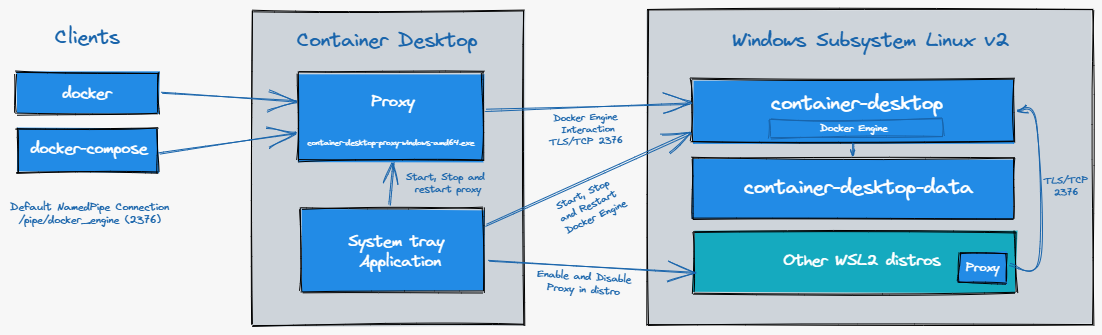
Container Desktop Proxy handles the communication with the Docker Engine running in the container-desktop distribution within Windows Subsystem for Linux v2 (WSL2). The proxy enables a native Docker experience on Microsoft Windows by translating Windows paths to WSL2 paths local to the container-desktop distribution.
With the Container Desktop system tray application you can manage the behavior of Container Desktop. You can start, stop, and restart the Container Desktop Proxy on the Windows host, or enable or disable a Docker Engine proxy in any available WSL2 distribution. Container Desktop installs the Docker CLI and Docker Compose command-line tools.
Note: Container Desktop does not support Windows Containers.
Why Container Desktop?
- Free and open-source.
- Easy, hassle-free installation experience.
- Plain and simple — no unnecessary bells and whistles.